SX Projector Lift Planning Guide for Concealed AV Installations
In This Guide
Quick Answer
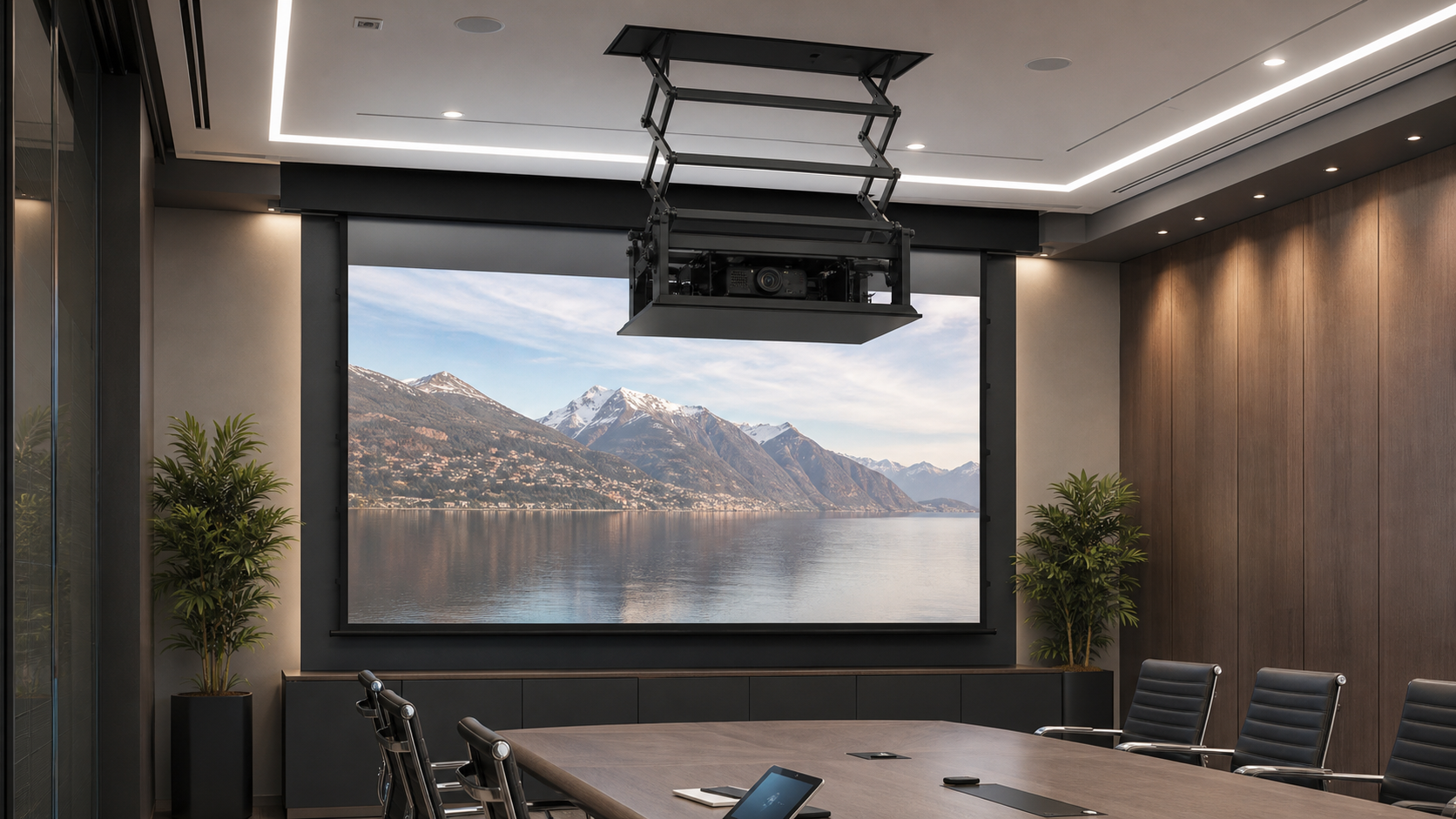
An SX projector lift should be planned as part of the ceiling, projector, screen and control system. It may help conceal a projector when the room needs a clean ceiling, but it adds a moving mechanism, a travel envelope, cable flex, access requirements and commissioning steps.
This guide is for AV integrators, contractors and project buyers. Exact lift travel, load, dimensions and safety features must be confirmed from the current SX model documentation.
Who This Guide Is For
This guide is for AV integrators, distributors, contractors and project buyers who need a documented selection and project-planning path for this topic before requesting a quotation.
Define the Concealed-AV Requirement
Explain why the projector must be lifted or concealed. Is the room multi-purpose, is the ceiling a finished architectural element, or must the projector be protected when not in use? The answer affects the lift position, access panel, operating sequence and service plan.
Record the ceiling height, void depth, projector model, lens position, screen image, cable route, room controller and final projector position. Use the In-Ceiling Electric Projection Screen product page and the Installation & Troubleshooting Hub as related internal links.
Confirm Projector Fit and Lift Envelope
Request the current SX drawing and compare:
- projector dimensions and installed weight;
- lift envelope above and below the ceiling;
- fixing points and support structure;
- projector orientation and lens clearance;
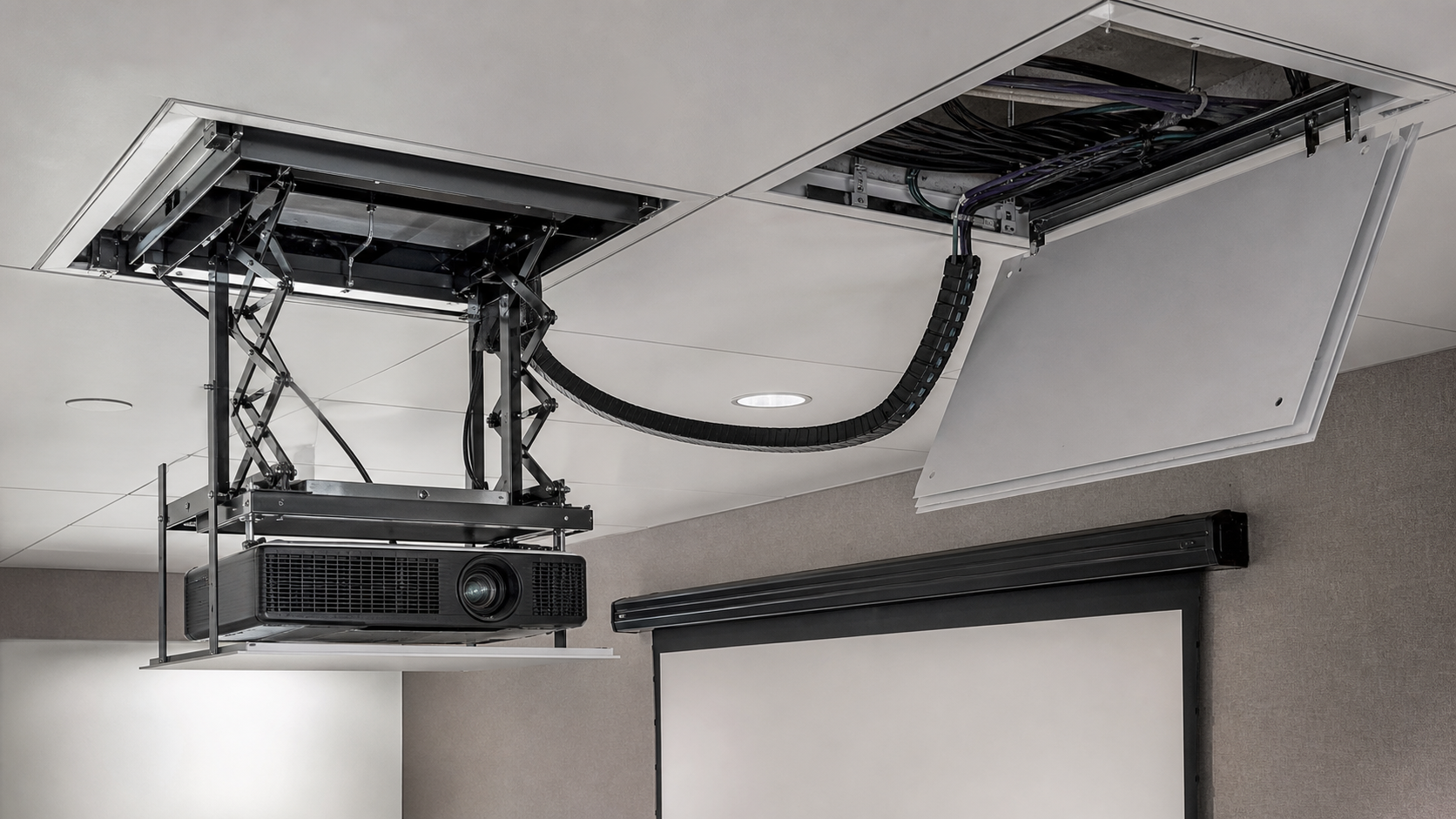
- cable flex route and connector access;
- ventilation and heat management;
- lower operating position and final alignment;
- service and replacement path.
Do not close the ceiling based on a product photograph. The lift, projector and screen centerline should be shown on an approved section drawing.
Coordinate the Screen and Projector
The SX lift must position the projector for the selected screen image. Confirm throw distance, lens shift, image width, aspect ratio, focus and sightlines. A projector lift cannot compensate for an incorrect screen size or a screen that is out of level.
Use the projector pairing guide and Screen Selection Hub to structure the image review. For room use, link the Conference Room or Commercial Display application.
Control and Commissioning
Define the operating sequence before wiring: screen down, projector lift down, projector on, presentation mode, then reverse after use. Confirm whether the SX lift uses local control, RF, IR, dry contact, serial or a room-control gateway. The exact interface must be verified by model.
Commissioning should test the upper and lower positions, stop behavior, projector alignment, screen image, cable movement and local override. Record the final lift position and screen centerline. If an obstruction or abnormal movement occurs, stop operation and isolate the system according to the installation instructions.
Service Access and Handover
Concealed equipment still needs a service route. Show the access panel, lifting points, controller location, cable slack, projector removal path and replacement plan on the drawing. Keep the approved SX model, projector model, screen model and control record together.
For a repeated project, assign a room ID and drawing revision to each lift. At handover, demonstrate local and integrated control, safe isolation, access-panel removal, screen limits and the procedure for reporting a fault. Factory information can be supported by Factory & Production; project requests should use Contact.
SX Lift RFQ Checklist
Include:
- SX model or required lift direction;
- projector model, dimensions and weight;
- ceiling section and support condition;
- lift envelope and access panel;
- cable and control method;
- screen size, position and throw geometry;
- ventilation and service route;
- commissioning and acceptance procedure;
- destination, quantity and drawing approval.
Decision Table
| Project condition | Direction to confirm | Approval action |
|---|---|---|
| Ceiling envelope | Lift location, structural support and service opening | Confirm dimensions and access on the coordinated reflected-ceiling plan. |
| Projector fit | Projector model, clearance, lens movement and cable routing | Validate the selected projector against the current lift drawing. |
| Screen coordination | Image plane, throw geometry and screen position | Review projector and screen drawings as one AV layout. |
| Control and power | Control sequence, isolation and responsibility | Confirm the exact interface and commissioning method for the selected equipment. |
| Handover | Access, drawings, labels and test record | Keep the final model, revision, installation and commissioning information in the handover package. |
MGF Product Direction
MGF can compare suitable product directions once the project brief confirms visible image size, aspect ratio, projector geometry, material direction, mounting condition, control requirements, quantity and destination market. The final quotation should identify the exact model, compatible material, drawing and approval information rather than treating a generic guide as a product specification.
Project / OEM Checklist
- visible image width, height and aspect ratio;
- projector model, lens position and image geometry;
- room or venue use, seating and ambient-light condition;
- proposed material, structure, mounting and service access;
- power, control and installation responsibility where relevant;
- required quantity, destination market, drawing revision and approval owner.
Continue Your Project Planning
- Screen Selection Guides
- Electric Projection Screens
- Fixed Frame Projection Screens
- Conference Room Applications
- Factory & Production
- Projection Screen Size and Aspect Ratio Guide
- Contact MGF Screens
FAQ
Can an SX lift conceal any projector?
No. Confirm dimensions, weight, orientation, ventilation, cable route and control compatibility for the exact model.
Does the lift include the projector or screen?
Do not assume. The quotation should clearly separate the lift, projector, screen, control and installation scope.
Can the lift be installed without an access panel?
Concealed equipment needs a documented service route. Follow the current installation and building requirements.
What is tested at handover?
Test upper/lower positions, stop behavior, control commands, alignment, cable movement, screen sequence and service access.
Request an SX Lift Planning Review
Send the projector, ceiling section, screen image, control system and service requirement to MGF Screens or the AV integrator. The lift should be approved only after the complete section and control sequence are clear.