Portable and Fast-Fold Screen Storage and Transport Checklist
---
Portable screens are exposed to more handling than permanently installed screens. The frame may be folded, the fabric may be removed, and the case may travel through doors, vehicles, loading areas and temporary venues. A repeatable packing method protects the screen and makes the next setup easier to verify.
In This Guide
Quick Answer
Inventory the complete system before packing: frame sections, fabric, legs, connectors, fasteners, case, tools and instructions. Clean and dry approved surfaces, protect corners and edges, keep fabric orientation visible, prevent heavy parts from contacting the surface, secure the case and record damage before transport. Store the system in the environment and orientation allowed by the product documentation; do not assume any portable screen is weatherproof or suitable for uncontrolled outdoor storage.
The portable folding vs Fast-Fold guide covers system selection. The OEM packaging and shipping guide can be used for factory packing coordination.
Who This Guide Is For
This guide is for AV integrators, distributors, contractors and project buyers who need a documented selection and project-planning path for this topic before requesting a quotation.
1. Build a Component Inventory
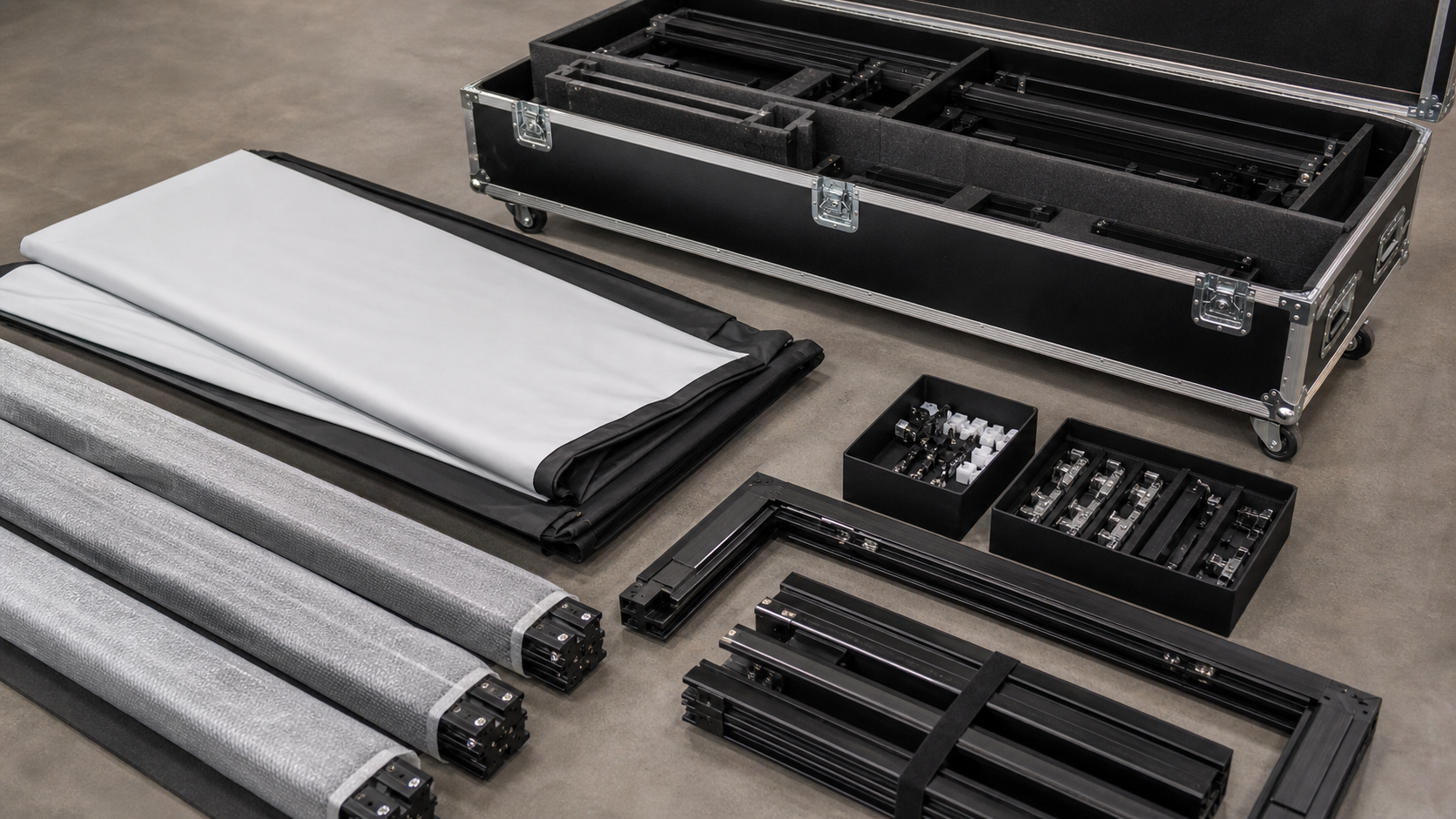
Create one checklist for every case or kit. Record frame sections, corner connectors, legs, braces, fabric, front/rear projection accessories, fasteners, tools, labels and spare parts. Photograph the open case before the first event so the team knows where each component belongs.
For repeated roadshows, give every frame section and bag a durable identifier that matches the packing list. If the exact system uses different parts, do not copy a generic Fast-Fold list without checking the supplied drawing.
Keep components tied to one kit
Use a packing record with component identity, quantity, condition and packing location. Connect the record to the supplied model and accepted scope, and photograph the approved arrangement where useful. When several screens travel together, keep each configuration's components identifiable. Report missing or damaged items before the next booking and update the record when a replacement is approved.
2. Handle the Surface First
Follow the approved cleaning method and let the material dry before folding or rolling. Keep shoes, tools, fasteners and sharp frame edges away from the viewing surface. Never drag a fabric across a floor or fold it with grit trapped inside.
Mark the viewing side and top orientation if the material or frame requires it. For rear projection or directional material, protect the correct surface and keep the packing label with the fabric.
3. Separate Heavy and Delicate Components
Frame sections, legs and hardware should be restrained so they cannot press against fabric or scratch a visible frame. Use the supplied sleeves, dividers or protective layers. Do not put loose connectors in the same compartment as the screen surface.
Check that the case closes without force. A case that only closes when the parts are compressed is a packing problem, not a sign that the system is secure.
4. Prepare for the Transport Route
Measure doors, lifts, vehicle access, ramps and storage locations. Record case dimensions and handling roles according to the actual product information. Use two-person handling or lifting equipment when required by the site plan; do not infer weight or load limits from a photograph.
Protect the case from rain, standing water, direct heat and impact. “Portable” describes movement between locations, not automatic outdoor or all-weather suitability. The outdoor screen safety guide should be reviewed separately when a project involves an outdoor venue.
5. Receive and Re-Inventory at the Venue
Inspect the case before opening. Photograph dents, wet packaging or broken seals. Open the case on a clean surface and compare every part with the inventory. Check frame corners, connectors, fabric edges, legs and accessories before assembly.
If a component is missing or damaged, document it before attempting an improvised repair. The event team should have a decision path for delay, spare parts or a safe alternative configuration.
Packing and Storage Table
| Item | Before packing | During transport | At storage or venue |
|---|---|---|---|
| Fabric | Clean, dry and oriented | Protected from sharp parts | Flat or rolled as instructed |
| Frame | Inspect joints and corners | Separated and restrained | Dry, supported and labeled |
| Legs/braces | Count and bag hardware | Protected from impact | Stored with matching kit |
| Case | Check latches and interior | Secured upright or as approved | Kept dry and accessible |
| Documents | Packing list and setup guide | Waterproof sleeve or digital copy | Reconcile with kit |
6. Create a Post-Event Record
After teardown, record missing parts, damaged edges, unusual fabric behavior, case condition and cleaning completed. A short record after each event is more useful than trying to reconstruct the history before the next shipment.
For distributors, use the same model or configuration code in the case label, packing list, purchase order and service record. The model traceability guide helps connect logistics to the supplied product.
MGF Product Direction
MGF can compare suitable product directions once the project brief confirms visible image size, aspect ratio, projector geometry, material direction, mounting condition, control requirements, quantity and destination market. The final quotation should identify the exact model, compatible material, drawing and approval information rather than treating a generic guide as a product specification.
Project / OEM Checklist
- visible image width, height and aspect ratio;
- projector model, lens position and image geometry;
- room or venue use, seating and ambient-light condition;
- proposed material, structure, mounting and service access;
- power, control and installation responsibility where relevant;
- required quantity, destination market, drawing revision and approval owner.
Continue Your Project Planning
- Installation & Troubleshooting Guides
- Electric Projection Screens
- Conference Room Applications
- Factory & Production
- Motorized Screen Troubleshooting Guide
- Contact MGF Screens
FAQ
Can a Fast-Fold screen stay in a vehicle overnight?
Only when the vehicle and product documentation support the temperature, moisture and security conditions. Do not assume a vehicle is a suitable storage room.
Should the fabric be folded or rolled?
Use the method specified for the exact material and system. If it is unclear, ask the supplier before packing.
Can I use the case as checked airline baggage?
Confirm case construction, dimensions, handling risk and the transport provider’s requirements. Add corner protection and a damage inspection process.
What if the fabric has a crease after transport?
Do not apply heat, stretch or chemicals without approved instructions. Photograph the issue and request technical guidance.
Request a Portable Logistics Review
Send the screen model, component list, case dimensions, transport route, storage conditions, setup frequency and destination venues to MGF through the Contact page. A project-specific packing list can then be aligned with the supplied system.